

MODOLIKS / FiveM notifications
Notify — AFTER HOURS
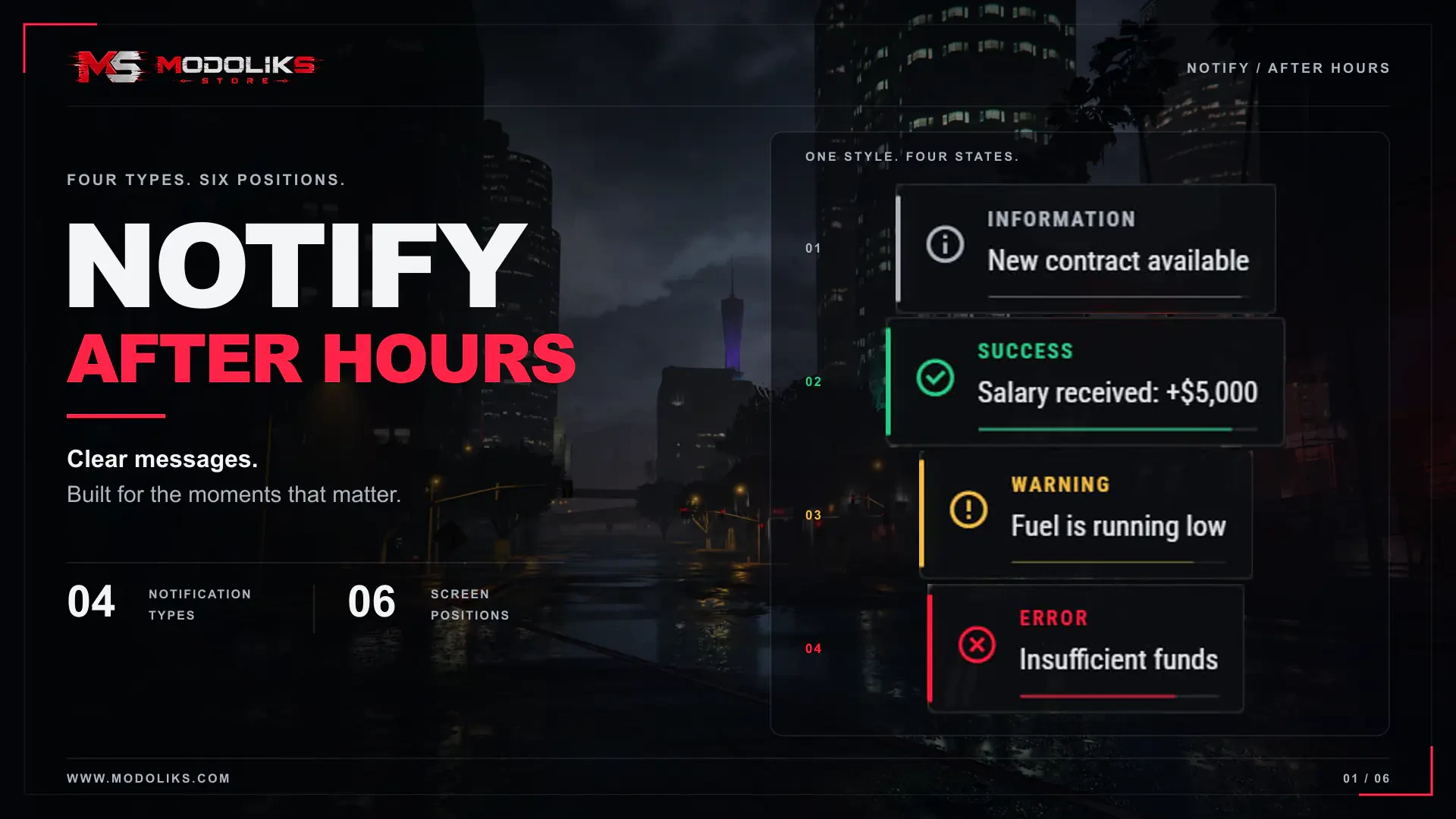
Clear messages. Four types. Six positions.
Keep players informed with compact notifications that match the moment. Notify — AFTER HOURS brings information, successful actions, warnings and errors into one consistent visual style. From a new contract to a received payment or low-fuel warning, each message has a recognizable accent and icon, with flexible placement to suit your server’s interface.
01 / Features
▦ What you can do
01
Four recognizable notification types
Information, success, warning and error each have their own color and icon. The heading, icon, side line and remaining-time bar share the same accent, making each type easy to recognize. Adjust the colors and icons to match your server’s style.
02
Six screen positions
Choose top center, top right, center right, bottom right, bottom center or center left. Keep one common position for all notifications, or allow calling scripts to choose a supported position for individual messages. Card spacing and screen-edge margins are configurable.
03
Compact cards with clear feedback
Short messages use less width, while longer text wraps within your chosen limits. Display a custom heading or the translated notification-type label, with an optional remaining-time bar. Entrance and exit transitions keep the presentation smooth, and notifications do not take mouse or keyboard focus from gameplay.
04
An orderly notification queue
Set how many notifications can appear at once and how many can wait. Queued messages start their display timer only when a visible slot becomes available. Default duration, minimum and maximum display times, and automatic dismissal control how messages move through the stack. When the waiting queue is full, new messages are rejected.
05
Connect your existing scripts
Send messages through the client and server interfaces, targeting one player or broadcasting to everyone. Supplied adapters can route standard QBCore, ESX and ox_lib notification calls into the same interface when connected as described in the included guide.
06
Update or clear existing messages
Assign an ID to update a matching visible or queued notification instead of adding another card. Custom scripts can refresh ongoing feedback, clear an individual message or clear the complete stack through the client interface.
02 / Make it yours
◇ Configuration & localization
Editable settings
shared/config.lua
- Placement: default screen position and permission for individual scripts to override it.
- Timing: default display duration and minimum/maximum duration limits.
- Message flow: maximum visible notifications and waiting queue size.
- Text limits: maximum message and custom-title lengths, plus the visible message-line limit.
- Card elements: heading visibility and remaining-time bar visibility.
- Sizing and spacing: maximum card width, interface scale, spacing between cards and screen-edge margin.
- Appearance: background color and opacity, with separate colors and icons for information, success, warning and error.
- Integrations: independent QBCore, ESX and ox_lib adapter switches; connection instructions are included in the guide.
- Compatibility checks: enable warnings and customize the list of other notification resources to check. These checks report potential conflicts without stopping other resources.
- Console output: control the normal startup message; warnings and errors remain visible.
Editable settings
ui/lang/locales/*.json
- Interface labels: editable translations in 31 locales, including the default notification-type headings.
- Language selection: follows the server’s shared language setting, with English fallback. Notification messages supplied by other scripts are controlled by those scripts and are not automatically translated.
Editable settings
locales/*.json
- Resource messages: editable console and diagnostic wording in 31 locales.
- Integration feedback: translate integration and compatibility messages for your server’s administrators.
03 / Included documentation
▤ Instructions in the archive
Installation instructions are included in the resource archive.
README-ENG.md contains the English guide, and README-RU.md contains the Russian guide.
04 / Explore & ask
↗ Preview & support
Try the resource on our preview servers. For questions about the resource, configuration or your project, use the MODOLIKS forum or contact us on Discord.
Optimized scripts
Clean, optimized scripts tested in-game for reliable performance and easy setup. Check each resource for framework support, dependencies and installation details.
Tested GTA V game builds: 3095, 3258, 3407, 3570, 3751, 3889.
Resource localizations
Resource UI text is prepared for all supported store languages, so players can use products in their preferred locale where the resource includes translation files.
Delivery & support
Automatic Tebex delivery, documentation and Discord support are included with every purchase.
For installation help, include the resource name, your framework and the error message or steps that reproduce the issue. For access questions, include your order details.