

FiveM real-weather sync / Real city conditions
ENVIRONMENTAL
CONTROL
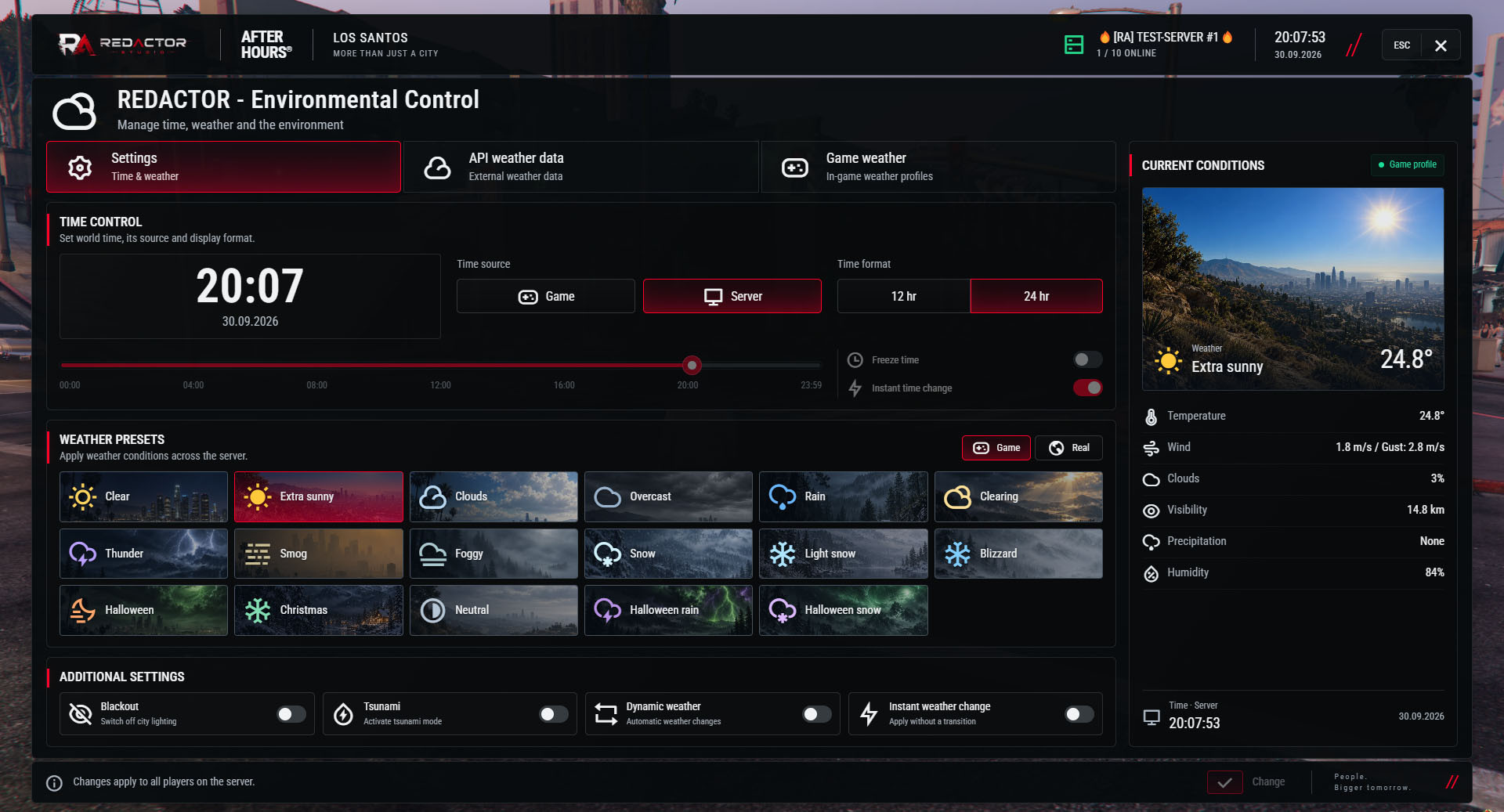
REDACTOR Environmental Control brings real-world weather into your FiveM server—without giving up control of the game world.
Choose a city, read its weather and let OpenWeather conditions map to GTA weather at scheduled updates. Game presets, dynamic cycles, time controls and blackout tools remain within reach.
01 / Bring a real place into the story
The source is your choice
REAL
→ GTA
City conditions.
Mapped game weather.
Rain in your city.
A different sky in Los Santos.
Imagine the real city your server is inspired by. Clouds arrive. The temperature drops. Rain starts moving through the streets.
Now that place can be the weather source for your server. Select the city, choose Real weather and apply your changes. At the configured update interval, the resource maps the received conditions to GTA weather.
It’s not about choosing RAIN every time. It’s about letting a real place help set the atmosphere.
02 / Select your real-weather location
Pick the place.
Let its weather in.
Your server may be set in Los Santos, but its weather can follow a selected real-world city. Location selection happens in the menu, without editing the config for every change.
01 / Choose the country
Search by country name or code in the API weather tab.
02 / Find the city
Search the bundled city catalog, select a result, or use a directly entered city name.
03 / Set the interval
Choose 30 minutes, 1 hour, 2 hours or 3 hours, then apply the change.
Current weather / Available update intervals
30 MIN
1 HOUR
2 HOURS
3 HOURS
The city catalog is a bundled snapshot, not a live directory of every place on Earth. Changing city or interval does not switch the active source by itself—select Real weather when you want the API to drive the world.
03 / OpenWeatherMap data in the menu
More than “it’s raining.”
See the conditions behind it.
Open API weather data and see what the selected city is reporting. Temperature, wind and visibility sit beside the source, last update and next-update information.
Temperature
Temperature and feels-like values.
Wind
Speed, with gusts and direction when provided.
Clouds & visibility
Cloud coverage and visibility distance.
Rain & snow
Precipitation details from the observation.
Humidity & pressure
Additional context from the real-weather data.
Weather readings appear when supplied by OpenWeather. In-game weather uses the mapped GTA preset.
04 / Real-weather forecast, history & alerts
API forecast
5 DAYS
3 HOUR STEPS
Look ahead.
Know what changed.
The API forecast brings the OpenWeather 5-day / 3-hour outlook into the menu. Forecast caching is separate from the current-weather update interval.
History records observations collected by this resource. Alerts use configured thresholds for conditions such as strong wind, heavy precipitation and low visibility.
History is not an archive download of arbitrary past weather. Alerts are generated locally from received conditions—not official emergency bulletins.
05 / Real weather or game weather—you choose
A real-world source.
Your game controls stay.
Environmental Control includes the game-weather and time tools available in Easy Time. A real-weather connection is an additional source, not a replacement for your administration menu.
Game presets & cycles
17 configured GTA presets, smooth or instant changes, and dynamic weather groups with configurable weights and intervals. Preset availability depends on the game build.
Game or host time
Set, freeze or advance game time, or use FXServer host date/time through ra_core. Choose 12/24-hour display. Selecting a weather city does not set the clock to that city’s timezone.
Blackout & storm warning
Control city lighting and optional vehicle lights. Tsunami mode adds storm effects and a siren, manually or at a matching txAdmin restart announcement.
A shared world
Synchronize existing and joining players. Keep game-profile conditions, locally generated forecasts, history and alerts alongside the separate API source.
Tsunami mode is a storm-and-warning effect. It does not flood the map, change water levels or restart the server.
06 / Know which source is active
See the source.
Not just the sky.
The Game weather and API weather pages show when their source is inactive. Cached data means opening the menu does not force another API request every time.
A failed request, invalid key or account limit can put real weather into the game fallback. Recovery checks and status messages help you see what happened before selecting the real-weather source again.
Your OpenWeather account
Real weather requires an OpenWeather key with access to Current weather and 5 day / 3 hour forecast. Availability and request limits depend on the provider and your account. Keep the supplied metric configuration for the Celsius/metres-per-second display.
07 / Configuration & setup
A city in the menu.
The details in your config.
Edit shared/config.lua for initial values, API behavior and your own control preferences.
// shared/config.lua
RAEnvironmentalControl.Config / SELECTED FIELD EXAMPLES
Edit fields inside the sections shown. Example values below are not a replacement config.
Weather
method = 'real',Weather.real
city = 'Kyiv,UA', checkMinutes = 30,WeatherApi
apiKey = 'YOUR_OPENWEATHER_KEY', units = 'metric',WeatherApi.forecast
enabled = true, checkMinutes = 60, maxItems = 40,WeatherApi.alerts
enabled = true,Time.game
tickMs = 5000, minutesPerTick = 1,Shared
command = 'easytime',Server.persistence
enabled = true,// ALSO CONFIGURABLE Weather.groups / Weather.gameProfile / Blackout / Tsunami / Server.permissions
Keep actual API keys out of public examples. The supplied shared config is not server-only secret storage.
Start the paid controller
ensure ra_core
ensure ra_environmental_control
add_ace group.admin command.easytime allow
Start your framework first. Requires ra_core 1.1.0+; QBox, QB-Core and ESX integration runs through the core. No SQL import. Administrators need the matching ACE permission; open /easytime in game.
Includes 31 interface/notification languages. Keep the supplied resource name and UI folder. Restart after editing Lua; ordinary config edits need no UI rebuild. Saved state can override initial defaults.
One world / One controller
Stop Easy Time before starting Environmental Control. Keep only one active weather/time controller; disable overlapping synchronization in other resources.
REDACTOR Environmental Control / FiveM real-weather system
Bring the weather in.
Keep the story moving.
One administration menu. Two weather sources. A city with its own atmosphere.
Optimized scripts
Clean, optimized scripts tested in-game for reliable performance and easy setup. Check each resource for framework support, dependencies and installation details.
Tested GTA V game builds: 3095, 3258, 3407, 3570, 3751, 3889.
Resource localizations
Resource UI text is prepared for all supported store languages, so players can use products in their preferred locale where the resource includes translation files.
Delivery & support
Automatic Tebex delivery, documentation and Discord support are included with every purchase.
For installation help, include the resource name, your framework and the error message or steps that reproduce the issue. For access questions, include your order details.